PDO Pool: Database Connection Pool
The Problem
When working with coroutines, the problem of sharing I/O descriptors arises. If the same socket is used by two coroutines that simultaneously write or read different packets from it, the data will get mixed up and the result will be unpredictable. Therefore, you cannot simply use the same PDO object in different coroutines!
On the other hand, creating a separate connection for each coroutine over and over is a very wasteful strategy. It negates the advantages of concurrent I/O. Therefore, connection pools are typically used for interacting with external APIs, databases, and other resources.
$pdo = new PDO('mysql:host=localhost;dbname=app', 'root', 'secret');

// Ten coroutines simultaneously use the same $pdo
for ($i = 0; $i < 10; $i++) {
    spawn(function() use ($pdo, $i) {
        $pdo->beginTransaction();
        $pdo->exec("INSERT INTO orders (user_id) VALUES ($i)");
        // Another coroutine already called COMMIT on this same connection!
        $pdo->commit(); // Chaos
    });
}
You could create a separate connection in each coroutine, but then with a thousand coroutines you'd get a thousand TCP connections. MySQL allows 151 simultaneous connections by default. PostgreSQL -- 100.
The Solution: PDO Pool
PDO Pool -- a database connection pool built into the PHP core. It automatically gives each coroutine its own connection from a pre-prepared set and returns it back when the coroutine finishes working.
$pdo = new PDO('mysql:host=localhost;dbname=app', 'root', 'secret', [
    PDO::ATTR_POOL_ENABLED => true,
    PDO::ATTR_POOL_MIN => 2,
    PDO::ATTR_POOL_MAX => 10,
]);

// Ten coroutines -- each gets its own connection
for ($i = 0; $i < 10; $i++) {
    spawn(function() use ($pdo, $i) {
        // Pool automatically allocates a connection for this coroutine
        $pdo->beginTransaction();
        $pdo->exec("INSERT INTO orders (user_id) VALUES ($i)");
        $pdo->commit();
        // Connection is returned to the pool
    });
}
From the outside, the code looks as if you're working with a regular PDO. The pool is completely transparent.
How to Enable
The pool is enabled via PDO constructor attributes:
$pdo = new PDO($dsn, $user, $password, [
    PDO::ATTR_POOL_ENABLED              => true,  // Enable pool
    PDO::ATTR_POOL_MIN                  => 0,     // Minimum connections (default 0)
    PDO::ATTR_POOL_MAX                  => 10,    // Maximum connections (default 10)
    PDO::ATTR_POOL_HEALTHCHECK_INTERVAL => 30000, // Health check interval (ms, 0 = disabled)
]);| Attribute | Meaning | Default |
|---|---|---|
POOL_ENABLED | Enable the pool | false |
POOL_MIN | Minimum number of connections the pool keeps open | 0 |
POOL_MAX | Maximum number of simultaneous connections | 10 |
POOL_HEALTHCHECK_INTERVAL | How often to check that a connection is alive (in milliseconds) | 0 |
POOL_STMT_CACHE_SIZE | Prepared-statement cache size per physical connection | 0 (off) |
Binding Connections to Coroutines
Each coroutine gets its own connection from the pool. All calls to query(), exec(), prepare() within a single coroutine go through the same connection.
$pdo = new PDO($dsn, $user, $password, [
    PDO::ATTR_POOL_ENABLED => true,
    PDO::ATTR_POOL_MAX => 5,
]);

$coro1 = spawn(function() use ($pdo) {
    // All three queries go through connection #1
    $pdo->query("SELECT 1");
    $pdo->query("SELECT 2");
    $pdo->query("SELECT 3");
    // Coroutine finished -- connection #1 returns to pool
});

$coro2 = spawn(function() use ($pdo) {
    // All queries go through connection #2
    $pdo->query("SELECT 4");
    // Coroutine finished -- connection #2 returns to pool
});
If a coroutine is no longer using the connection (no active transactions or statements), the pool may return it earlier -- without waiting for the coroutine to finish.
Prepared-statement cache
Enabled with the PDO::ATTR_POOL_STMT_CACHE_SIZE => N attribute when constructing the PDO. The pool keeps an LRU cache of the last N prepared statements per physical connection. When a coroutine re-runs prepare() with the same SQL, the pool returns the already-prepared server-side statement — no round trip to the database.
$pdo = new PDO($dsn, $user, $password, [
    PDO::ATTR_POOL_ENABLED         => true,
    PDO::ATTR_POOL_MAX             => 10,
    PDO::ATTR_POOL_STMT_CACHE_SIZE => 64,   // up to 64 stmts per connection
]);

spawn(function () use ($pdo) {
    for ($i = 0; $i < 1000; $i++) {
        // First call: a real PREPARE on the server.
        // Every subsequent call on this connection: cache hit, zero wire traffic.
        $stmt = $pdo->prepare('SELECT name FROM users WHERE id = ?');
        $stmt->execute([$i]);
        $row = $stmt->fetch();
    }
});
On a tight prepare → execute → fetch loop this gives ~2.9× speedup (depending on the driver and workload).
Supported drivers
pdo_pgsql, pdo_mysql, pdo_sqlite.
When the cache is bypassed
The cache is automatically skipped in the following cases to preserve semantics:
PDO_CURSOR_SCROLL— the server-side cursor of a scrollable result cannot be reused.PDO::ATTR_EMULATE_PREPARES = true— emulated queries have no server-side statement.PGSQL_ATTR_DISABLE_PREPARES— an explicit opt-out on the PG driver side.
Cache invalidation on schema / plan changes
If a table's schema changes (ALTER TABLE), the server-side plan of an old statement may stop being valid. The pool recognises such errors and transparently re-runs the query: the stale statement is evicted from the cache, a new prepare is issued, and the user code gets a successful result on the first try.
| Driver | Error codes that trigger a retry |
|---|---|
| PostgreSQL | SQLSTATE 0A000 (feature not supported, cached plan must not change result type), 26000 (invalid SQL statement name) |
| MySQL | 1243 (unknown prepared statement handler), 1615 (prepared statement needs to be re-prepared), 2057 (statement has wrong column count) |
How big should it be?
The LRU operates independently per physical connection, so the total prepared-statement memory on the DB server is roughly POOL_MAX × POOL_STMT_CACHE_SIZE statements at peak.
Reasonable values:
- web app with a couple dozen unique SQL strings —
16..32; - service with a wide variety of queries —
64..256; - if SQL is essentially unique every time — the cache buys nothing, leave it at
0.
Transactions
Transactions work the same as in regular PDO. But the pool guarantees that while a transaction is active, the connection is pinned to the coroutine and won't return to the pool.
spawn(function() use ($pdo) {
    $pdo->beginTransaction();

    $pdo->exec("UPDATE accounts SET balance = balance - 100 WHERE id = 1");
    $pdo->exec("UPDATE accounts SET balance = balance + 100 WHERE id = 2");

    $pdo->commit();
    // Only after commit can the connection return to the pool
});
Automatic Rollback
If a coroutine finishes without calling commit(), the pool automatically rolls back the transaction before returning the connection to the pool. This is a safeguard against accidental data loss.
spawn(function() use ($pdo) {
    $pdo->beginTransaction();
    $pdo->exec("DELETE FROM users WHERE id = 1");
    // Forgot commit()
    // Coroutine finished -- pool will call ROLLBACK automatically
});
Connection Lifecycle
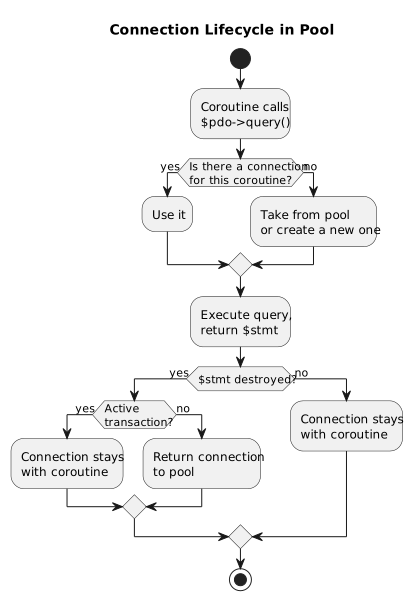
A detailed technical diagram with internal calls is in the PDO Pool architecture.
Accessing the Pool Object
The getPool() method returns the Async\Pool object through which you can get statistics:
$pool = $pdo->getPool();

if ($pool !== null) {
    echo "Pool is active: " . get_class($pool) . "\n"; // Async\Pool
}
If the pool is not enabled, getPool() returns null.
When to Use
Use PDO Pool when:
- The application runs in asynchronous mode with TrueAsync
- Multiple coroutines simultaneously access the database
- You need to limit the number of connections to the database
Not needed when:
- The application is synchronous (classic PHP)
- Only one coroutine works with the database
- Persistent connections are used (they are incompatible with the pool)
Supported Drivers
| Driver | Pool Support |
|---|---|
pdo_mysql | Yes |
pdo_pgsql | Yes |
pdo_sqlite | Yes |
pdo_odbc | No |
Error Handling
If the pool cannot create a connection (wrong credentials, unavailable server), the exception is propagated to the coroutine that requested the connection:
$pdo = new PDO('mysql:host=localhost;dbname=app', 'root', 'wrong_password', [
    PDO::ATTR_ERRMODE => PDO::ERRMODE_EXCEPTION,
    PDO::ATTR_POOL_ENABLED => true,
    PDO::ATTR_POOL_MIN => 0,
]);

spawn(function() use ($pdo) {
    try {
        $pdo->query("SELECT 1");
    } catch (PDOException $e) {
        echo "Failed to connect: " . $e->getMessage() . "\n";
    }
});
Note POOL_MIN => 0: if you set the minimum higher than zero, the pool will try to create connections in advance, and the error will occur when creating the PDO object.
Broken Connection Recovery
In a long-running async application connections can break at any moment: the database server restarts, a DBA kills a session, a network glitch drops the TCP link, or a coroutine is cancelled while a query is in flight. Without special handling the broken connection would silently return to the pool and the next coroutine to use it would get a confusing error like MySQL server has gone away.
PDO Pool solves this automatically at two levels.
Automatic detection on return
When a connection is returned to the pool (after a coroutine finishes or releases it), the pool checks whether the connection is still healthy. If the connection is broken — it is destroyed instead of being placed back into the pool. The next coroutine gets a fresh, working connection.
$pdo = new PDO('mysql:host=localhost;dbname=app', 'root', 'secret', [
    PDO::ATTR_ERRMODE      => PDO::ERRMODE_EXCEPTION,
    PDO::ATTR_POOL_ENABLED => true,
    PDO::ATTR_POOL_MAX     => 5,
]);

spawn(function () use ($pdo) {
    $pdo->query("SELECT SLEEP(30)");
    // Meanwhile the DBA runs: KILL <connection_id>
    // The query throws PDOException.
    // When this coroutine ends, the pool detects the broken connection
    // and destroys it instead of returning it to the pool.
});

spawn(function () use ($pdo) {
    // This coroutine gets a brand-new healthy connection,
    // NOT the killed one from the previous coroutine.
    $rows = $pdo->query("SELECT * FROM users")->fetchAll();
});
Transparent reconnect on retry
When a coroutine catches an error from a broken connection and retries the query on the same $pdo object, the pool transparently discards the broken connection and acquires a fresh one. No manual reconnection code needed:
spawn(function () use ($pdo) {
    try {
        $pdo->query("SELECT 1");
    } catch (PDOException $e) {
        // Connection was broken (server restart, network issue, etc.)
        // The pool has already discarded the broken connection internally.

        // Just retry — the pool gives this coroutine a new connection:
        $pdo->query("SELECT 1"); // works
    }
});
This means a simple try/catch with a retry is all you need for robust connection handling. You do not need to create a new PDO object or manually reconnect — the pool does it for you.
Scenarios covered
| Scenario | What happens |
|---|---|
| Database server restarts | Broken connections are detected and destroyed on return to pool |
| DBA kills a session | Same — the killed connection never reaches another coroutine |
| Coroutine cancelled mid-query | Connection is detected as broken and destroyed |
| Network timeout / TCP reset | Pool discards the connection, next acquire gets a fresh one |
Error State Isolation
In a pool each coroutine shares the same $pdo PHP object but uses a different underlying database connection. PDO Pool ensures that error state from one coroutine never leaks into another.
errorCode() and errorInfo()
Each coroutine sees only its own error state through $pdo->errorCode() and $pdo->errorInfo(). A failed query in one coroutine does not affect the error code seen by another:
$pdo = new PDO('mysql:host=localhost;dbname=app', 'root', 'secret', [
    PDO::ATTR_POOL_ENABLED => true,
]);

$coro1 = spawn(function () use ($pdo) {
    $pdo->query("SELECT * FROM nonexistent_table"); // fails
    echo $pdo->errorCode(); // e.g. "42S02" — only this coroutine's error
});

$coro2 = spawn(function () use ($pdo) {
    $pdo->query("SELECT 1"); // succeeds
    echo $pdo->errorCode(); // "00000" — not affected by coro1's failure
});
Consistent initial state
$pdo->errorCode() always returns "00000" before the first query in a coroutine, even when multiple coroutines start concurrently on fresh connections.
spawn(function () use ($pdo) {
    // Guaranteed "00000", never NULL — even on a fresh pool connection
    echo $pdo->errorCode(); // "00000"
});
Real-World Example: Parallel Order Processing
use function Async\spawn;
use function Async\await;

$pdo = new PDO('mysql:host=localhost;dbname=shop', 'app', 'secret', [
    PDO::ATTR_ERRMODE            => PDO::ERRMODE_EXCEPTION,
    PDO::ATTR_POOL_ENABLED       => true,
    PDO::ATTR_POOL_MIN           => 2,
    PDO::ATTR_POOL_MAX           => 5,
]);

// Get a list of orders to process
$orders = [101, 102, 103, 104, 105, 106, 107, 108, 109, 110];

$coroutines = [];
foreach ($orders as $orderId) {
    $coroutines[] = spawn(function() use ($pdo, $orderId) {
        // Each coroutine gets its own connection from the pool
        $pdo->beginTransaction();

        $stmt = $pdo->prepare("SELECT * FROM orders WHERE id = ? FOR UPDATE");
        $stmt->execute([$orderId]);
        $order = $stmt->fetch();

        if ($order['status'] === 'pending') {
            $pdo->exec("UPDATE orders SET status = 'processing' WHERE id = $orderId");
            $pdo->exec("INSERT INTO order_log (order_id, action) VALUES ($orderId, 'started')");
        }

        $pdo->commit();
        return $orderId;
    });
}

// Wait for all coroutines to complete
foreach ($coroutines as $coro) {
    $processedId = await($coro);
    echo "Order #$processedId processed\n";
}
Ten orders are processed concurrently, but through a maximum of five database connections. Each transaction is isolated. Connections are reused between coroutines.
What's Next?
- Interactive PDO Pool Demo -- a visual demonstration of connection pool operation
- PDO Pool Architecture -- pool internals, diagrams, connection lifecycle
- Coroutines -- how coroutines work
- Scope -- managing groups of coroutines
- spawn() -- launching coroutines
- await() -- awaiting results